
Enchanting (rpg-enchanting)
Status: Working (v0.6.0+) — Custom enchants, reforges, and item upgrades all functional. Reforge stones and upgrade books are physical items applied in the anvil GUI. Enchant descriptions render in item lore. GUIs open from custom enchanting/anvil blocks. Vanilla enchanting-table + anvil suppressed. Minecraft XP level cost is wired: each enchant YAML specifies
XpCost:(integer levels); the cost is shown in the enchant slot lore and deducted on apply. Telekinesis ships as a built-in enchant, reforge, and upgrade — all three giveauto_loot: 1so drops go straight to inventory.
One addon bundling four related "improve your gear" features. Each sub-feature is individually toggleable.
Design intent
Enchants, reforges, and upgrades are three separate systems intentionally: enchants are tiered per-slot progressions that build up over time (you apply more, you get stronger); reforges are identity modifiers — one per item, they define the item's archetype (a "Sharp" sword vs a "Heavy" one); upgrades are consumable stacks that compound a single progression path. Keeping them separate means players make meaningful choices about how to develop an item rather than just piling on buffs.
- Enchanting skill — XP from applying enchants
- Enchanting mechanic — custom enchants applied at a custom enchanting block
- Reforge mechanic — apply a reforge to an item for stat bundles (random or via consumable stones)
- Item upgrades — apply
UPGRADE-type items via a custom anvil block
Vanilla enchanting tables and anvils are cancelled (per vanilla suppression).
Config
plugins/rpg-enchanting/config.yml:
# Per-feature toggles.
features:
  enchanting: true
  reforges: true
  upgrades: true

# Station block IDs to listen on (legacy — prefer setting StationType in block YAML instead).
stations:
  enchanting-block: rpg_enchanting_table
  anvil-block: rpg_custom_anvil

# Whether to also intercept the vanilla enchanting table / anvil (default true).
intercept-vanilla-enchanting: true
intercept-vanilla-anvil: true

# Skill XP awarded on successful operation.
xp:
  per-enchant: 25
  per-reforge: 15
  per-upgrade: 40

# Whether enchants/reforges/upgrades require currency in addition to materials.
charge-currency: true

# Whether XpCost: in each enchant YAML deducts vanilla XP levels on apply.
# false = XP cost is informational only — not deducted
charge-xp: true

# Mirror of rpg-core vanilla-suppression flags (convenience overrides).
suppress:
  enchanting-table: true
  anvil: true
Custom enchants
Files under plugins/rpg-enchanting/enchants/<file>.yml.
Enchants fall into four patterns — they can be mixed on a single enchant:
| Pattern | What it does | How |
|---|---|---|
| Stat enchant | Adds stats to the item while equipped | levels: N: { stats: { stat_id: value } } |
| Proc enchant | Fires an ability at a % chance on a trigger | levels: N: { triggers: [{ event: on_hit, chance: 10, ability: some_ability }] } — requires Ability Trigger Types feature |
| Ability enchant | Grants or replaces an ability on the item | levels: N: { abilities: [fireball{}] } |
| Utility enchant | Changes a gameplay flag (infinite ammo, etc.) | Not yet wired — planned |
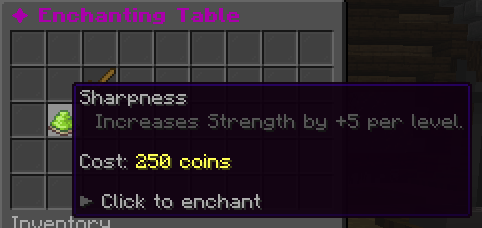
Stat enchant example
sharpness:
  DisplayName: "&7Sharpness"
  Description:
    - "Increases Strength by +5 per level."
  MaxLevel: 5
  AppliesTo: [sword]
  Stats:
    strength: 5
  ScalePerLevel: 1.0
  XpCost: 5        # vanilla Minecraft XP levels consumed on apply; 0 or omit = no XP cost
  CurrencyCost: 250
  RequiredLevel: 1  # min enchanting skill level
Enchant fields
| Field | Default | Description |
|---|---|---|
DisplayName |
id | Color-coded name shown in GUI and item lore |
Description |
[] |
Lines of lore shown below the enchant name in the GUI slot |
MaxLevel |
1 |
Maximum enchant level for this enchant |
AppliesTo |
[] |
List of item type IDs, or [any] for all items |
Stats |
{} |
Stat bonuses at level 1; scaled by ScalePerLevel each level |
ScalePerLevel |
1.0 |
Linear multiplier — level 2 = 2×, level 3 = 3×, etc. |
XpCost |
0 |
Vanilla Minecraft XP levels deducted from the player on apply. Shown in the GUI slot lore. Set 0 or omit for currency-only enchants. Global switch: charge-xp: false in config disables deduction. |
CurrencyCost |
0 |
rpg-economy cost deducted on apply (requires rpg-economy). Global switch: charge-currency: false |
RequiredLevel |
1 |
Minimum Enchanting skill level required to apply |
Both XpCost and CurrencyCost are checked before either is deducted — if the player can't afford both, they get an error and nothing is charged.
Ability enchant example
Grants an ability directly on the item. Higher levels upgrade the ability's parameters. The ability fires with the item's default trigger (right-click for swords/wands, on-fire for bows).
flame_blade:
  display: "&cFlame Blade"
  applies-to: [SWORD]
  max-level: 3
  levels:
    1:
      abilities:
        - "projectile{speed=1.5, particle=FLAME, damage_multiplier=0.5}"
    2:
      abilities:
        - "projectile{speed=2.0, particle=FLAME, damage_multiplier=0.8}"
    3:
      abilities:
        - "projectile{speed=2.5, particle=FLAME, damage_multiplier=1.2} apply_status{id=burn, duration=60}"
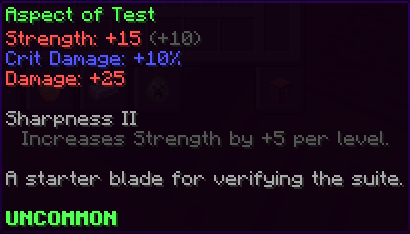
Ability enchants replace any ability granted by the previous level of the same enchant — they do not stack. If you want the enchant to add a second ability on top of the item's existing ones, reference the item's original ability ID in the lower-level entries too.
Proc enchant example
⚠️ Proc enchants (
triggers:) are not yet functional. Thetriggers:field is parsed but the Custom Enchantment Ability Triggers system (item 39 in todo.md) is not yet implemented. Define proc enchants now for future compatibility, but they will not fire until that feature ships.
thunderstrike:
  display: "&eThunderstrike"
  applies-to: [SWORD, AXE]
  max-level: 3
  levels:
    1: { triggers: [{ event: on_hit, chance: 5,  ability: lightning_strike }] }
    2: { triggers: [{ event: on_hit, chance: 10, ability: lightning_strike }] }
    3: { triggers: [{ event: on_hit, chance: 15, ability: lightning_strike }] }
  conflicts: []
Conflict example — fire and frost enchants cannot coexist
fire_aspect:
  display: "&cFire Aspect"
  applies-to: [SWORD]
  max-level: 2
  levels:
    1: { triggers: [{ event: on_hit, chance: 100, ability: apply_fire }] }
    2: { triggers: [{ event: on_hit, chance: 100, ability: apply_fire_strong }] }
  conflicts: [frost_aspect]      # prevents both being on the same item

frost_aspect:
  display: "&bFrost Aspect"
  applies-to: [SWORD]
  max-level: 2
  levels:
    1: { triggers: [{ event: on_hit, chance: 100, ability: apply_slow }] }
    2: { triggers: [{ event: on_hit, chance: 100, ability: apply_slow_strong }] }
  conflicts: [fire_aspect]
Reforges
Files under plugins/rpg-enchanting/reforges/<file>.yml. A reforge replaces any existing reforge on the item and shows as a colored prefix on the item name (e.g. &7Sharp &fIron Sword).
Reforges apply flat stat modifiers — the values are added to the item's effective stats regardless of rarity. Rarity-scaled reforges are not yet supported.
# Offensive — boosts crits
sharp:
  display: "&7Sharp"
  applies-to: [SWORD]
  modes:
    pay-currency-random: true    # available at the enchanting station for currency (random reforge)
    stone: true                  # can also be applied via the physical reforge stone item
  stone-item-id: sharp_reforge_stone
  effect:
    stats:
      crit_chance: 5
      crit_damage: 10

# Offensive — raw damage
heavy:
  display: "&cHeavy"
  applies-to: [SWORD, AXE]
  modes:
    pay-currency-random: true
    stone: true
  stone-item-id: heavy_reforge_stone
  effect:
    stats:
      strength: 15
      crit_chance: -2

# Caster — magic + mana
arcane:
  display: "&5Arcane"
  applies-to: [WAND]
  modes:
    pay-currency-random: true
    stone: true
  stone-item-id: arcane_reforge_stone
  effect:
    stats:
      intelligence: 40
      max_mana: 100

# Defensive — survivability
fortified:
  display: "&6Fortified"
  applies-to: [ARMOR]
  modes:
    pay-currency-random: true
    stone: true
  stone-item-id: fortified_reforge_stone
  effect:
    stats:
      defense: 20
      max_health: 50
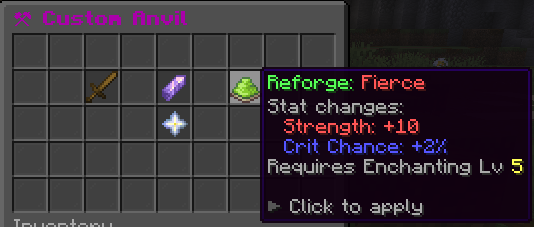
The physical reforge stone items (e.g. sharp_reforge_stone) are UPGRADE-type items defined in your items/ YAML — they appear in the anvil GUI alongside the target item. Use /enchanting give reforge <id> to hand them to players for testing.
Upgrades
UPGRADE-type items, defined in normal items/ YAML. See items.md.
Applied via the anvil GUI: drop the target item + the upgrade item, click to consume the upgrade and apply its effect. MaxStacks per-target enforced.
Custom station blocks
Both the enchanting station and anvil are custom blocks (define them in blocks/):
custom_enchanting_table:
  MinecraftBlock: enchanting_table
  Toughness: 200
  Interactable: true
  StationType: enchanting
  Drops:
  - vanilla:enchanting_table 1

custom_anvil:
  MinecraftBlock: anvil
  Toughness: 300
  Interactable: true
  StationType: anvil
  Drops:
  - vanilla:anvil 1
Commands
| Command | Permission | Notes |
|---|---|---|
/enchanting reload |
rpg.enchanting.admin.reload |
Reloads all enchant/reforge YAML |
/enchanting list |
rpg.enchanting.admin.list |
Lists all registered enchant/reforge IDs |
/enchanting give enchant <id> |
rpg.enchanting.admin.give |
Gives a named enchant book |
/enchanting give reforge <id> |
rpg.enchanting.admin.give |
Gives the named reforge stone item |
/enchanting give upgrade <id> |
rpg.enchanting.admin.give |
Gives the named upgrade book item |
Station blocks open the enchanting/anvil GUIs on right-click. The commands are admin utilities.
Stats
enchanting_wisdom— XP bonus